Just a quick new announcement: this blog has moved! I've decided to move Code & Visuals to a Jekyll/Github Pages based system, located at blog.yiningkarlli.com. For more details, see this new post.
I'll leave this Blogger version around, but from now on, new posts will be at the new place. RSS/Atom feeds should transition over automatically.
See you on the other side!
Showing posts with label Announcements. Show all posts
Showing posts with label Announcements. Show all posts
Saturday, November 16, 2013

Saturday, July 27, 2013
Pixar Optix Lighting Preview Demo
For the past two months or so, I've been working at Pixar Animation Studio as a summer intern with Pixar's Research Group. The project I'm on for the summer is a realtime, GPU based lighting preview tool implemented on top of NVIDIA's OptiX framework, entirely inside of The Foundry's Katana. I'm incredibly pleased to be able to say that our project was demoed at SIGGRAPH 2013 at the NVIDIA booth, and that NVIDIA has a recording of the entire demo online!
The demo was done by our project's lead, Danny Nahmias, and got an overwhelmingly positive reception. Check out the recording here:
FXGuide also did a podcast about our demo! Check it out here.
I'm just an intern, and the vast majority of the cool work being done on this project is from Danny Nahmias, Phillip Rideout, Mark Meyer, and others, but I'm very very proud, and consider myself extraordinarily lucky, to be part of this team!
Edit: I've replaced the original Ustream embed with a Vimeo mirror since the Ustream embed was crashing Chrome for some people. The original Ustream link is here.
The demo was done by our project's lead, Danny Nahmias, and got an overwhelmingly positive reception. Check out the recording here:
I'm just an intern, and the vast majority of the cool work being done on this project is from Danny Nahmias, Phillip Rideout, Mark Meyer, and others, but I'm very very proud, and consider myself extraordinarily lucky, to be part of this team!
Edit: I've replaced the original Ustream embed with a Vimeo mirror since the Ustream embed was crashing Chrome for some people. The original Ustream link is here.
Friday, May 25, 2012
New Photoblog!
I have a new photoblog!
Karl Has A Camera
Why start a photoblog when I already have this blog? Well, I originally started this blog as just a general catch-all blog for my projects, adventures, and such, but over the past year or so, this blog has evolved into a heavily computer-graphics projects focused blog, hence the name change from "Karu Blog" to "Code and Visuals" a while back. As such, I've decided to spin off my photos and adventuring into "Karl Has A Camera" in order to keep things more organized.
I'm going to keep my backup archive (explanation here) unified, but from now on, for my public facing stuff, "Code and Visuals" is for computer graphics projects and occasional doodles and art projects, and "Karl Has A Camera" is for photos and adventuring.
My first post on "Karl Has A Camera" is about East Nanjing Road in Shanghai!
Actually, this reminds me: I am currently also working on redesigning yiningkarlli.com and Likimmun, and also working on the waaaayyyy overdue Omjii relaunch. Those will all be coming soon!
We now return to our regularly scheduled computer graphics programming.
Karl Has A Camera
Why start a photoblog when I already have this blog? Well, I originally started this blog as just a general catch-all blog for my projects, adventures, and such, but over the past year or so, this blog has evolved into a heavily computer-graphics projects focused blog, hence the name change from "Karu Blog" to "Code and Visuals" a while back. As such, I've decided to spin off my photos and adventuring into "Karl Has A Camera" in order to keep things more organized.
I'm going to keep my backup archive (explanation here) unified, but from now on, for my public facing stuff, "Code and Visuals" is for computer graphics projects and occasional doodles and art projects, and "Karl Has A Camera" is for photos and adventuring.
My first post on "Karl Has A Camera" is about East Nanjing Road in Shanghai!
Actually, this reminds me: I am currently also working on redesigning yiningkarlli.com and Likimmun, and also working on the waaaayyyy overdue Omjii relaunch. Those will all be coming soon!
We now return to our regularly scheduled computer graphics programming.
Saturday, October 2, 2010
likimmun.
Ana Kim, Sarah Mun, and I are starting a joint daily photoblog! Each day all three of us upload a photo to the site. We're supposed to try to post recently taken photos, but tapping into our older shots is okay too as long as the shot being posted hasn't been published before. The site is running on a modified version of the Omjii engine.
So every day, three photos by the three of us.
I'm really excited. Why don't you take a look?
Bonus: This is the photo we used for the site teaser:

It's one of my dad's old lenses. :)
So every day, three photos by the three of us.
I'm really excited. Why don't you take a look?
Bonus: This is the photo we used for the site teaser:

It's one of my dad's old lenses. :)
Friday, June 18, 2010
Omjii+Wordpress=New Blogging System
As you can see, my blog looks different from what it looked like a few days back! What's going on?
Omjii Blogs is getting a massive massive overhaul, that's what's going on.
8 months ago, Jason, Chris, and I announced the Omjii Blog System, a blogging engine derived from the Omjii Comic System powering our little webcomic. Initially the creation of the Omjii Blog System was meant to be just an exercise in designing and coding a basic dynamic content management system. This meant that the Omjii Blog System took shape as a relatively simple blogging engine that delivered the core functionality of a blog, but omitted a lot of the bells and whistles offered by systems built by people who actually know what they are doing, such as WordPress or Movable Type or Blogger. We invited our friends to try out the Omjii Blog System and give the system a general real-life usage test in order to evaluate how good of a job we did. After 8 months of continuous use, I think we can safely say that the Omjii Blog System successfully met our goal of a simple, lightweight content management system.
However, in those 8 months, the test blogs that started on the Omjii Blog System developed into full-fledged actual blogs, regularly updated by their authors. Omjii Blogs now faces a very different purpose from its original purpose- initially designed as an academic exercise, Omjii Blogs is now supporting live, actual blogs by our friends. Now that Omjii Blogs is a real life, albeit very small, blogging platform, we need to be able to address all of the blogging needs of our users- needs that the Omjii Blog System was not designed to handle. As a result, we have decided to move forward with deploying a modified version of WordPress MultiUser on Omjii Blogs. Most of the modifications made to WordPress MU were to integrate WordPress MU into our existing Omjii system and to ensure backward compatibility with the Omjii Blog System. All Omjii blogs will be migrated from the Omjii Blog System to the much more powerful WordPress MU system. So what does this change mean? Here are four of the many new changes:
1. Better, faster, more robust editing tools. While writing a post, you can now switch between visual and HTML modes to get your post to look exactly the way you want it to look. Inserting images and videos from Youtube, Vimeo, etc. is now much easier as well.
2. File uploads. You can now upload images, music files, video files, documents, PDFs, pretty much anything you please (minus a few security related restrictions, such as PHP files) to a folder in your blog.
3. Configurable layouts. Instead of being restricted to the standard Omjii layout of the Omjii Blog System, you can now stack text, navigation elements, widgets, etc. any way you please.
4. Themes. Instead of having to stick with the preset Omjii look and style, you can make your blog look any way you want by using WordPress themes. All standard WordPress themes work with our Omjii variant of WordPress MU, although some themes require minor tweaking to work. For that reason, before you can apply a new theme you have picked out, we need to screen the theme first to make sure necessary tweaks are made. Don't worry, we won't stand in the way of your creativity and refuse the use of any themes. Our tweaks also won't change the outward appearance of the theme, the tweaks are only made to the underlying mechanics that run the theme.
Here are some examples of themes, demonstrated with the Emma Blog. The Omjii Blog System look is on the left, WordPress themes are displayed to the right:


Applying a new theme doesn't require any coding or messy work at all. All you have to do is click a button. The new themes functionality brought to Omjii Blogs by the adoption of WordPress MU is really really cool. :)
The modifications we've made to WordPress MU are for getting WordPress MU to integrate into Omjii's existing user system and to ensure backward compatibility with the Omjii Blog System. So what does that mean?
1. Nothing has changed about how you log into Omjii. Just as before, logging in is done through the Switcheroo tool and the main Omjii site is still the same Omjii you know and (hopefully) love. However, when you sign in to your Omjii account, you will also be automatically signed into Omjii's WordPress MU system as well, so you can start posting without having to dig around for a new login page on Omjii. You can also sign in separately to WordPress MU.
2. Every last bit of content that was written and posted on the Omjii Blog System will show up in WordPress MU. We have added a layer to WordPress MU that allowed WordPress MU to be able to read, understand, and import posts from the Omjii Blog System. Your Omjii Blog will now sport a new look due to WordPress MU, but not a single word you wrote has been lost in the process. :D
3. Similar to how all of your content remains intact in WordPress MU, all of the metadata surrounding your posts also remain intact. Facebook Comments made to your posts on the Omjii Blog System show up completely intact in WordPress MU as if no change ever occurred. Even all of your permalinks are intact- going to a permalink for a post originally written in the Omjii Blog System will now lead to the same post in your WordPress MU powered blog. Even your RSS feed works just like it always has- you don't even need to point subscribers at a new RSS feed location.
We've worked hard to make sure that the transition from the Omjii Blog System to WordPress MU will be perfectly smooth and absolutely seamless. Happy blogging!
Friday, January 22, 2010
New Server!
As many of you may have noticed, at around 6:30 AM on Friday (Jan. 22nd), Omjii.com went offline. Something happened at our hosting service (we're still not really sure what) with our server, which wiped out all of Omjii's data. Hence the site going offline.
Fortunately, we backed up our server only a few days back! At the time of this posting, all data has been successfully recovered. Excellent news. However, we've switched servers.
Previously, we were using a cheap-o server at a company that'll remain unnamed here. That server ran all right most of the time, but tended to get really slow at times and at other times produced random glitches and errors that messed with the site.
No more shall that happen. Today we've switched to the excellent, excellent people at Arvixe for our hosting and server needs. The new server we've got is nice, shiny, big, clean, and crazy fast. Like, race-horse duct taped to a scud-missile fast. We luurrvvee it. :)
So, our new server is quite amazing and most excellent. However, repointing our URL away from our old servers and at our new servers requires something called DNS propagation. If you're interested, the Wikipedia article linked to there provides plenty of technical info. For those who couldn't care less about the tech side, however, all you need to know is that when you change what site a URL leads to, the change isn't instantaneous. Because of how the Internet works, different areas will get the updated URL at different times, meaning Omjii will remain broken longer for some of you than others. Propagation should only take up to 24 hours, however, so by tomorrow everything will be back to normal.
Fortunately, we backed up our server only a few days back! At the time of this posting, all data has been successfully recovered. Excellent news. However, we've switched servers.
Previously, we were using a cheap-o server at a company that'll remain unnamed here. That server ran all right most of the time, but tended to get really slow at times and at other times produced random glitches and errors that messed with the site.
No more shall that happen. Today we've switched to the excellent, excellent people at Arvixe for our hosting and server needs. The new server we've got is nice, shiny, big, clean, and crazy fast. Like, race-horse duct taped to a scud-missile fast. We luurrvvee it. :)
So, our new server is quite amazing and most excellent. However, repointing our URL away from our old servers and at our new servers requires something called DNS propagation. If you're interested, the Wikipedia article linked to there provides plenty of technical info. For those who couldn't care less about the tech side, however, all you need to know is that when you change what site a URL leads to, the change isn't instantaneous. Because of how the Internet works, different areas will get the updated URL at different times, meaning Omjii will remain broken longer for some of you than others. Propagation should only take up to 24 hours, however, so by tomorrow everything will be back to normal.
Sunday, January 17, 2010
Stuff About Fonts
Just a quick note:
Today we've added a nifty little addition to Omjii's Switcheroo tool- Typesetting options!
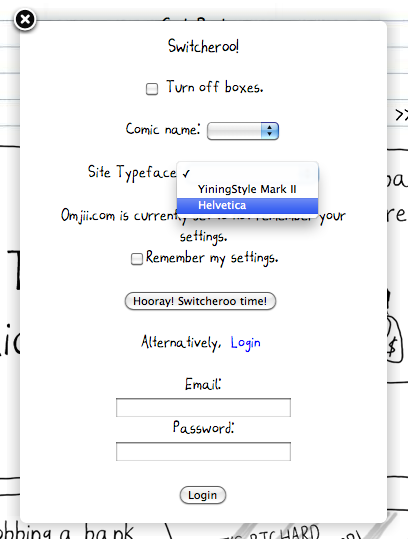
Up to now, the site has been typeset exclusively with Omjii's custom YiningStyle Mark II font (download link here). We've been accomplishing custom typesetting through the use of the @font-face rules that are in CSS3, meaning all HTML5/CSS3 compliant browsers (Firefox 3.5 and up, Safari 4 and up, Chrome 2 and up, etc) have been displaying Omjii with our custom font. Internet Explorer users see the site typeset in Arial since IE has really bizarre support for @font-face (don't worry, we're working on a workaround).
Now, however, you can use the Switcheroo tool to retypeset the site in Helvetica! We're implemented this new option due to request by several readers (Mindy was particularly outspoken about this). We'll add other fonts in the future.
The Switcheroo Typeset option works like all other Switcheroo options.
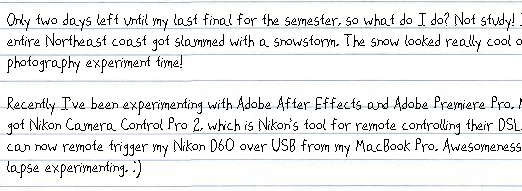
On a related note, if you're on a PC and have noticed that the Omjii font (and all other fonts on your computer, for that matter) looks jagged, the reason is probably because you have ClearType turned off. ClearType is Windows' font-smoothing option for the Windows font renderer. Basically, font-smoothing is a method for making fonts on computer screens look less jagged and more, well, smooth. Mac OSX users, don't worry about this, OSX smooths fonts by default.
A visual example might be the best way to explain the difference between font-smoothing and sans font-smoothing. Here's Omjii's font sans font-smoothing:
...and here with font-smoothing:
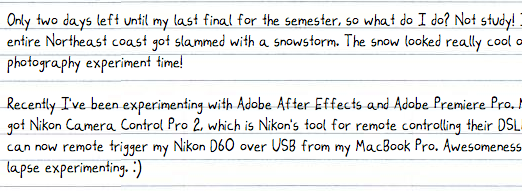
Clearly, font-smoothing looks much nicer. :)
Today we've added a nifty little addition to Omjii's Switcheroo tool- Typesetting options!
Up to now, the site has been typeset exclusively with Omjii's custom YiningStyle Mark II font (download link here). We've been accomplishing custom typesetting through the use of the @font-face rules that are in CSS3, meaning all HTML5/CSS3 compliant browsers (Firefox 3.5 and up, Safari 4 and up, Chrome 2 and up, etc) have been displaying Omjii with our custom font. Internet Explorer users see the site typeset in Arial since IE has really bizarre support for @font-face (don't worry, we're working on a workaround).
Now, however, you can use the Switcheroo tool to retypeset the site in Helvetica! We're implemented this new option due to request by several readers (Mindy was particularly outspoken about this). We'll add other fonts in the future.
The Switcheroo Typeset option works like all other Switcheroo options.
On a related note, if you're on a PC and have noticed that the Omjii font (and all other fonts on your computer, for that matter) looks jagged, the reason is probably because you have ClearType turned off. ClearType is Windows' font-smoothing option for the Windows font renderer. Basically, font-smoothing is a method for making fonts on computer screens look less jagged and more, well, smooth. Mac OSX users, don't worry about this, OSX smooths fonts by default.
A visual example might be the best way to explain the difference between font-smoothing and sans font-smoothing. Here's Omjii's font sans font-smoothing:
...and here with font-smoothing:
Clearly, font-smoothing looks much nicer. :)
Saturday, October 31, 2009
Omjii Blog Engine Preview
So I've been mentioning an "Omjii Blog System" for a long while now. In fact, the existence of an Omjii Blog System should be obvious if you're reading this right now. This blog is, after all, is sitting on Omjii.com. That's because this blog is actually the test bed for Omjii Blog System stuff.
So what is the Omjii Blog System? It's simple- a blogging engine derived from the Omjii Comic Engine running the main site. The Omjii Comic Engine that Jason and I wrote about a year ago started as a photo blogging engine that morphed itself into a webcomic engine once Chris, Jason, and I decided to start posting our doodles online. At some point, we realized that the Omjii Comic Engine very much resembled a blogging engine underneath- which makes sense, since a. the engine started life as a photo blogging tool and b. a webcomic is, in fact, a blog. So we started to experiment with extending the Omjii Comic Engine into a full blogging tool. Why? Why not?
Our goal isn't to face off against Wordpress or Moveable Type or Blogger or whatever. The point of writing the Omjii Blog Engine is purely academic- writing a content management system is a good exercise for coders. The nice side effect of this exercise, however, is that we might just end up with a nice, simple, useable little tool. Sweet. For now, two experimental blogs are running on the engine: this blog, and Emma Ricciardi's Emma Blog. In addition, Ana Kim's The WAHH! Blog forwards through Omjii to Blogger and will eventually be hosted here.
So! What does this engine entail for Omjii.com? Well, we'll be offering Omjii Blogs to people soon as the Omjii Blog Engine approaches completion. It ain't Wordpress, but the cool thing about the Omjii Blog Engine is that we will constantly be tinkering with it and adding cool new things to the bag of tricks it can do.
The introduction of Omjii Blogs is naturally going to mean some revisions to the main site design. Here's some concept doodles of what it's going to look like:
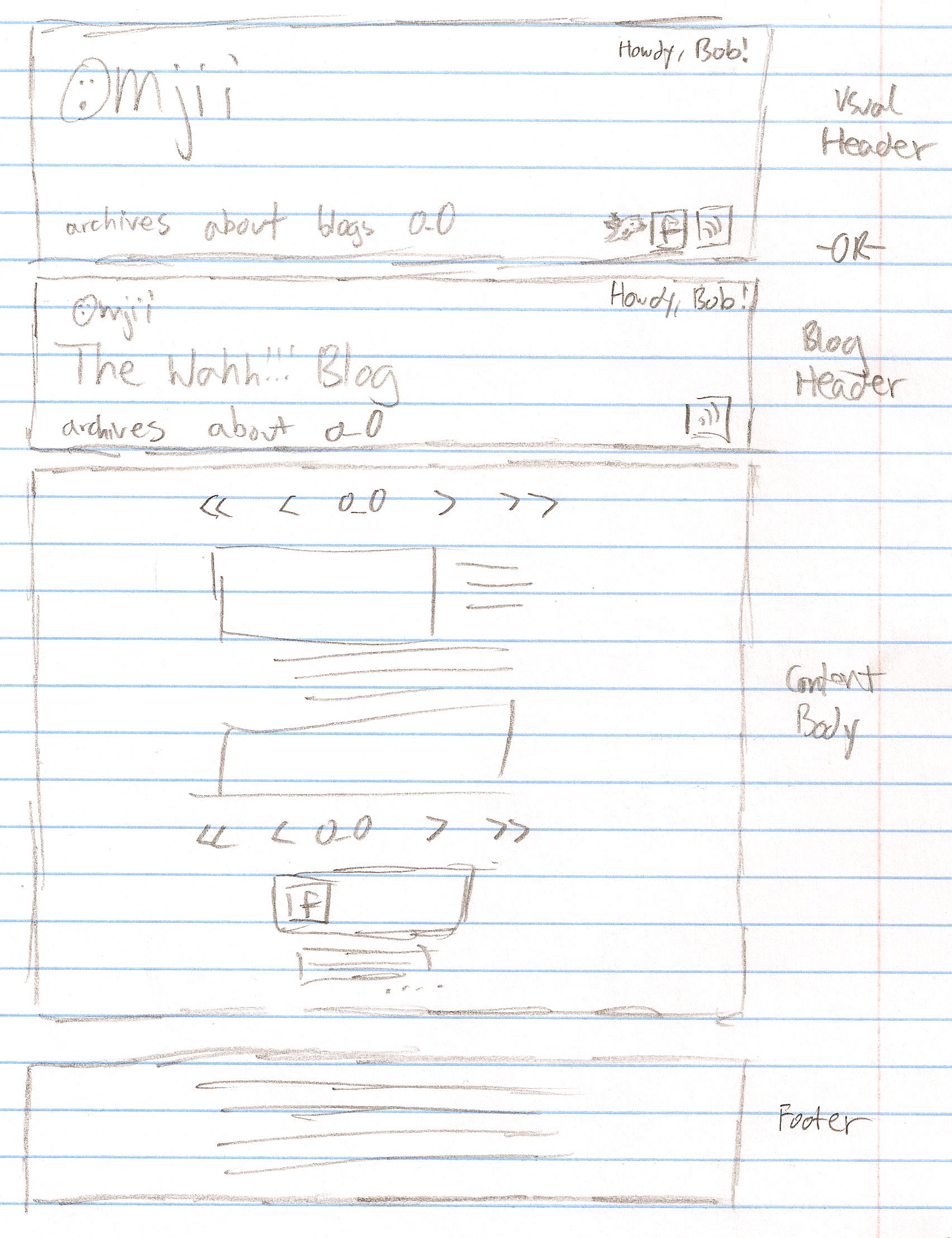
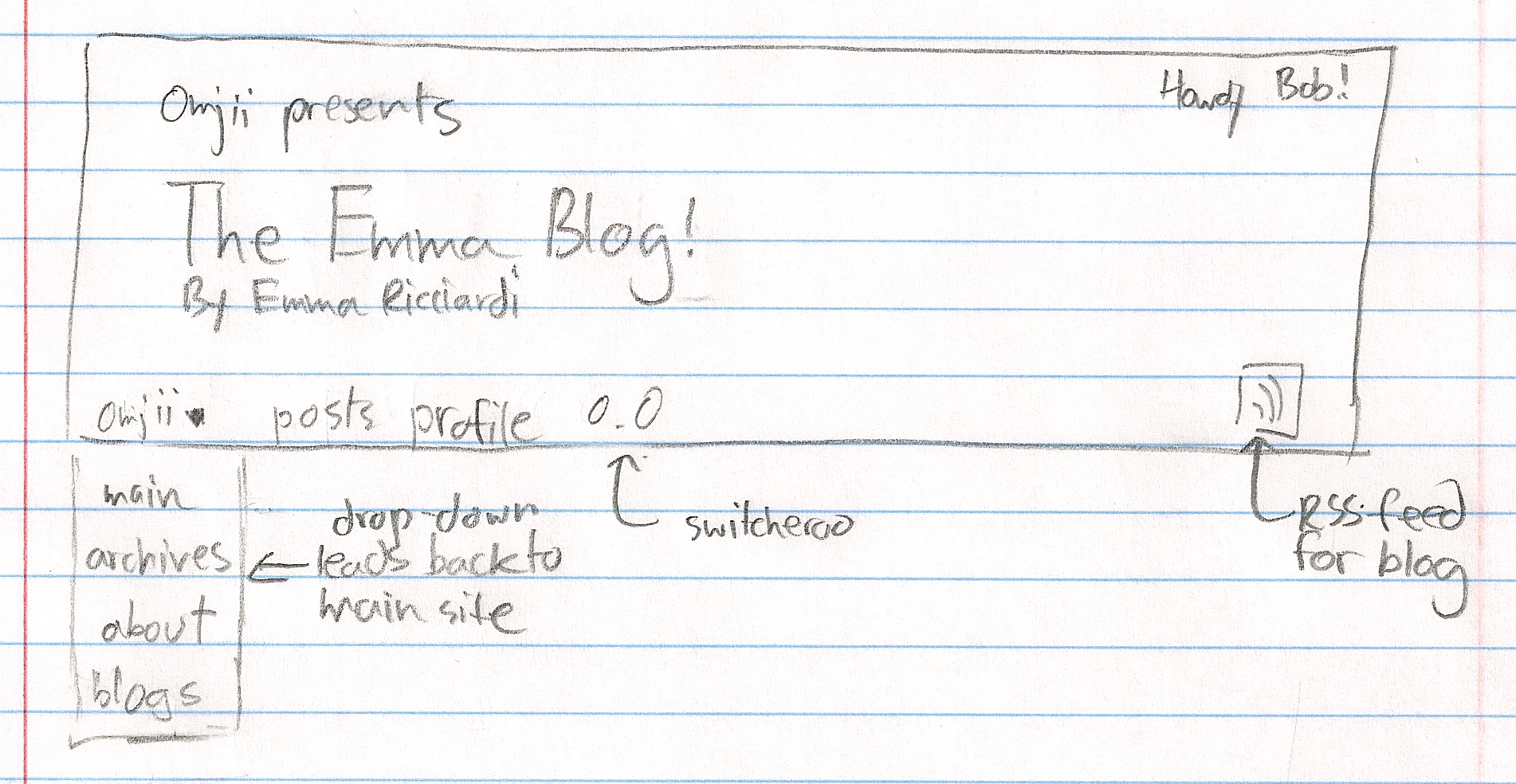
The first doodle shows two headers. The top header is the standard Omjii header that flies over the main site. The second header, however, is new. When you go from the main comic site to, say, the Emma Blog, the header of the site will magically change into the second, blog oriented header.
The second doodle shows an updated design for the second, blog oriented header.
Finally, the updated new main header is actually completed and ready to go live. We're just waiting on a few things before releasing it into the wild. It looks like this:
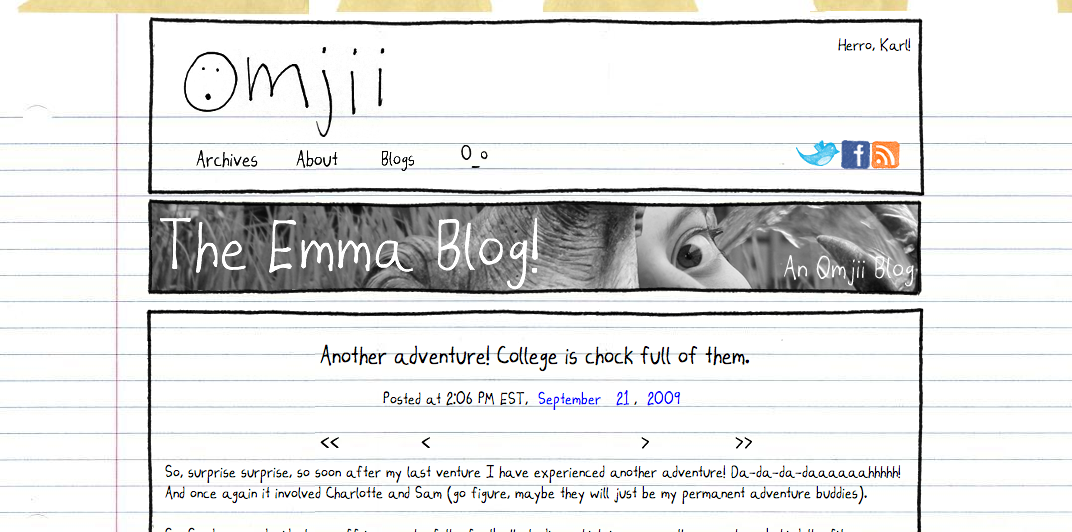
So those are some cool new things to expect in the coming weeks!
So what is the Omjii Blog System? It's simple- a blogging engine derived from the Omjii Comic Engine running the main site. The Omjii Comic Engine that Jason and I wrote about a year ago started as a photo blogging engine that morphed itself into a webcomic engine once Chris, Jason, and I decided to start posting our doodles online. At some point, we realized that the Omjii Comic Engine very much resembled a blogging engine underneath- which makes sense, since a. the engine started life as a photo blogging tool and b. a webcomic is, in fact, a blog. So we started to experiment with extending the Omjii Comic Engine into a full blogging tool. Why? Why not?
Our goal isn't to face off against Wordpress or Moveable Type or Blogger or whatever. The point of writing the Omjii Blog Engine is purely academic- writing a content management system is a good exercise for coders. The nice side effect of this exercise, however, is that we might just end up with a nice, simple, useable little tool. Sweet. For now, two experimental blogs are running on the engine: this blog, and Emma Ricciardi's Emma Blog. In addition, Ana Kim's The WAHH! Blog forwards through Omjii to Blogger and will eventually be hosted here.
So! What does this engine entail for Omjii.com? Well, we'll be offering Omjii Blogs to people soon as the Omjii Blog Engine approaches completion. It ain't Wordpress, but the cool thing about the Omjii Blog Engine is that we will constantly be tinkering with it and adding cool new things to the bag of tricks it can do.
The introduction of Omjii Blogs is naturally going to mean some revisions to the main site design. Here's some concept doodles of what it's going to look like:
The first doodle shows two headers. The top header is the standard Omjii header that flies over the main site. The second header, however, is new. When you go from the main comic site to, say, the Emma Blog, the header of the site will magically change into the second, blog oriented header.
The second doodle shows an updated design for the second, blog oriented header.
Finally, the updated new main header is actually completed and ready to go live. We're just waiting on a few things before releasing it into the wild. It looks like this:
So those are some cool new things to expect in the coming weeks!
Subscribe to:
Posts (Atom)